low friction, high function
My favourite AI tools have one thing in common: they are low friction, high function.
What does that mean?
Low friction means designing interaction patterns between humans and LLMs in ways that require the fewest cognitive resources.
High function means harnessing the growing inference capabilities of LLMs in ways that deliver outsized gains in productivity.
Granola, an AI-powered notepad for meetings, exemplifies this. It packages the magic of LLMs into lightweight, finely detailed interaction patterns, resulting in a delightful user experience.
One such pattern is Recipes. Recipes are saved prompts that can be invoked with simple slash commands. Think of them as the equivalent of Skills in Claude, i.e. structured prompts saved in your directory to automate repetitive tasks. Recipes, much like Skills, make complex tasks low effort. They remove friction while ensuring maximum output.
Because recipes are immensely powerful for getting high-function output with minimal effort, I think they deserve more visual real estate on the Granola app.
As a Granola power user and a product thinker, here is a feature pitch: Pinned Recipes.
Pinned Recipes are recipes that live at the folder level and are triggered whenever a new meeting or note is added. Instead of manually invoking the same prompts, outputs are continuously updated and visible in one place.
The images and textual cues below provide an overview of pinned recipes.
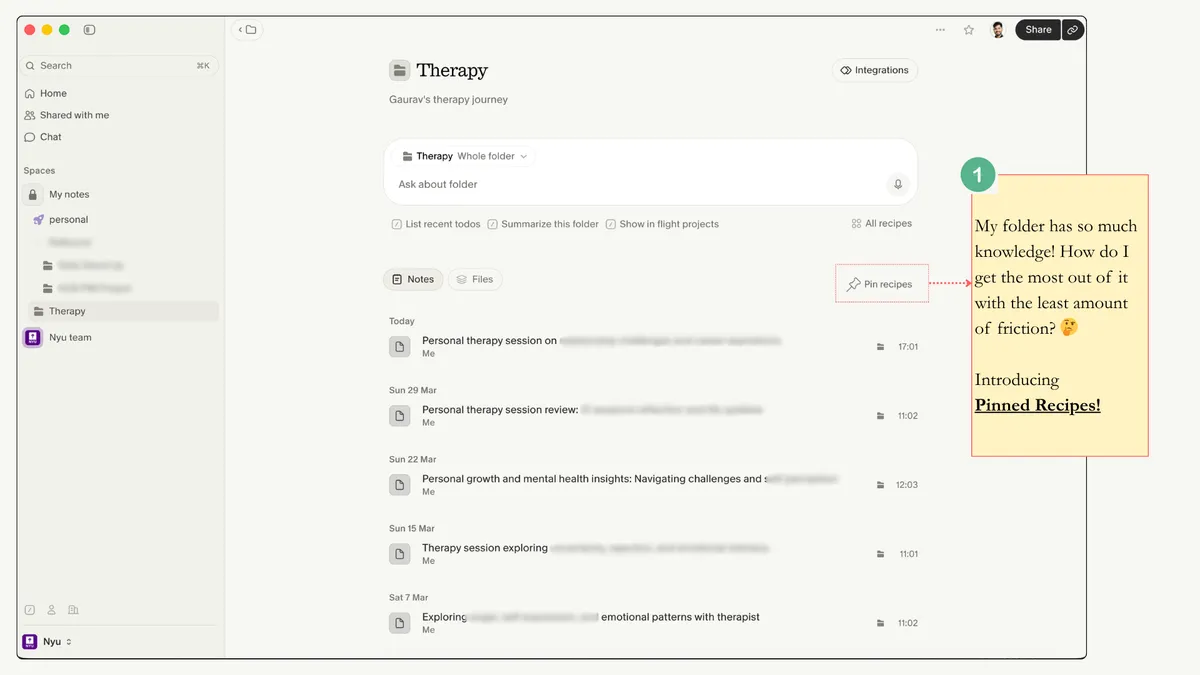
I love using Granola for therapy sessions. I often rely on Granola Chat to recall details or generate journal prompts. But I noticed I run the same prompt after every session:
"Based on the conversations from the last 3 sessions, give me a few journal prompts."
Pinned Recipes solve this by making that output persistent and automatic.
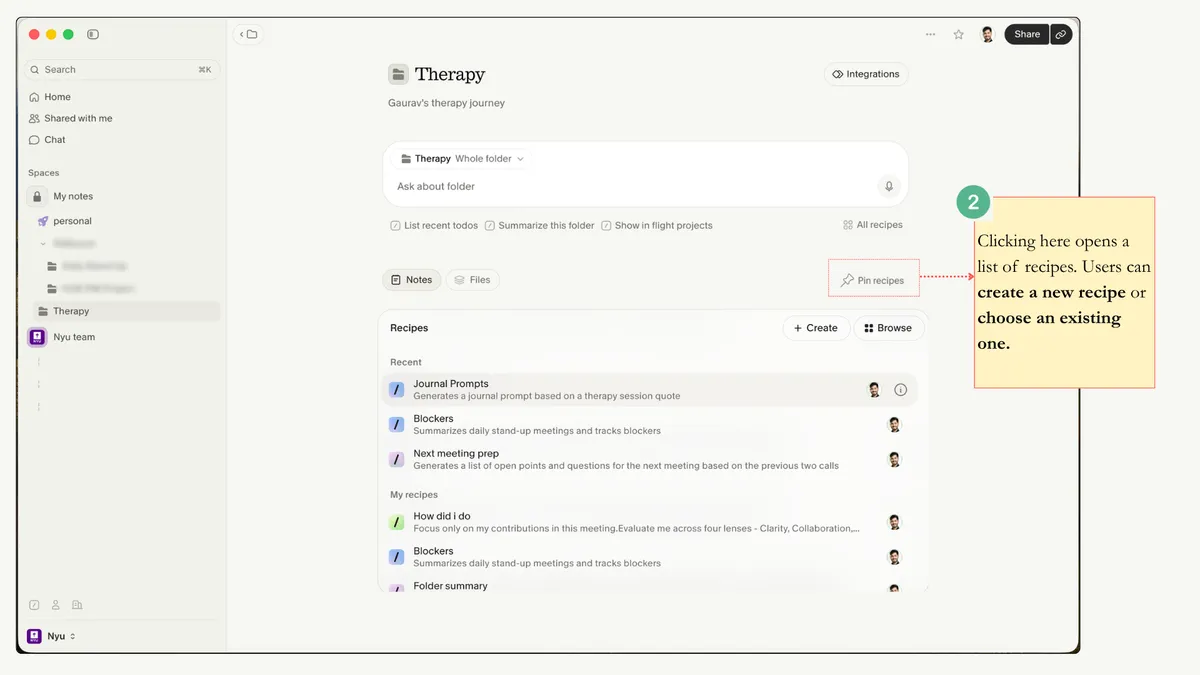
The entry point is simple: a small icon on the folder page.
Clicking Pin recipes opens the recipes list view. Users can pin an existing recipe or create a new one.
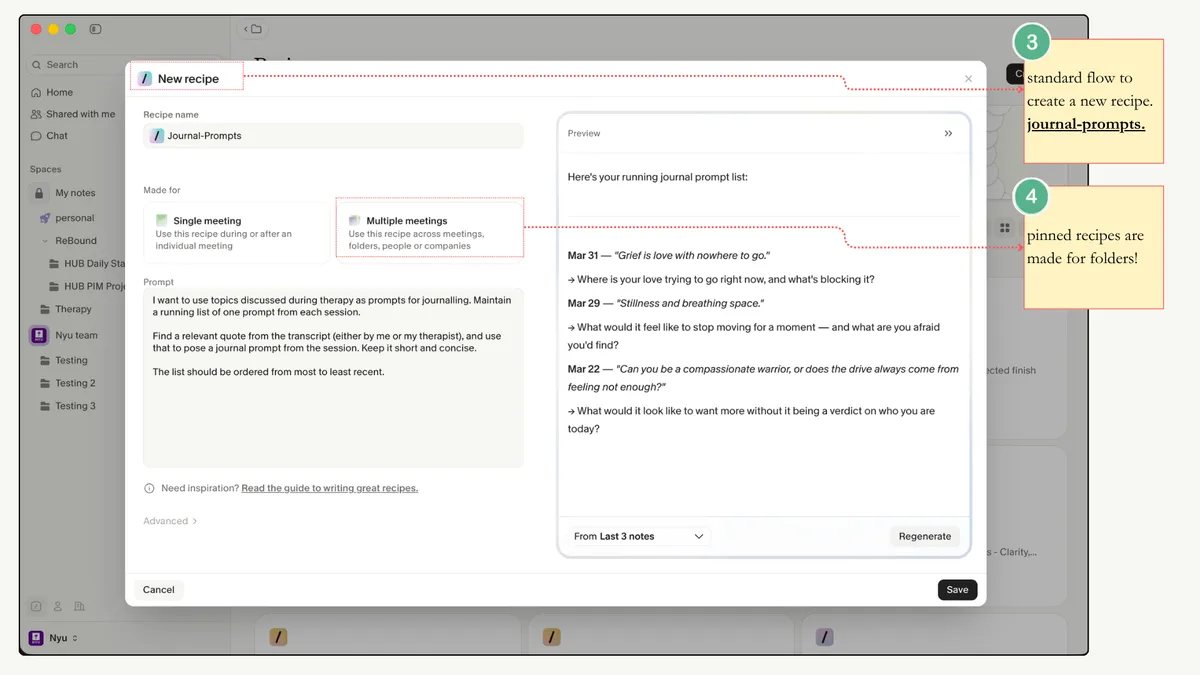
I created a recipe called journal-prompts. Because it operates at the folder level, it pulls context across multiple meetings. The creation flow includes a preview, so you can test the output before saving.
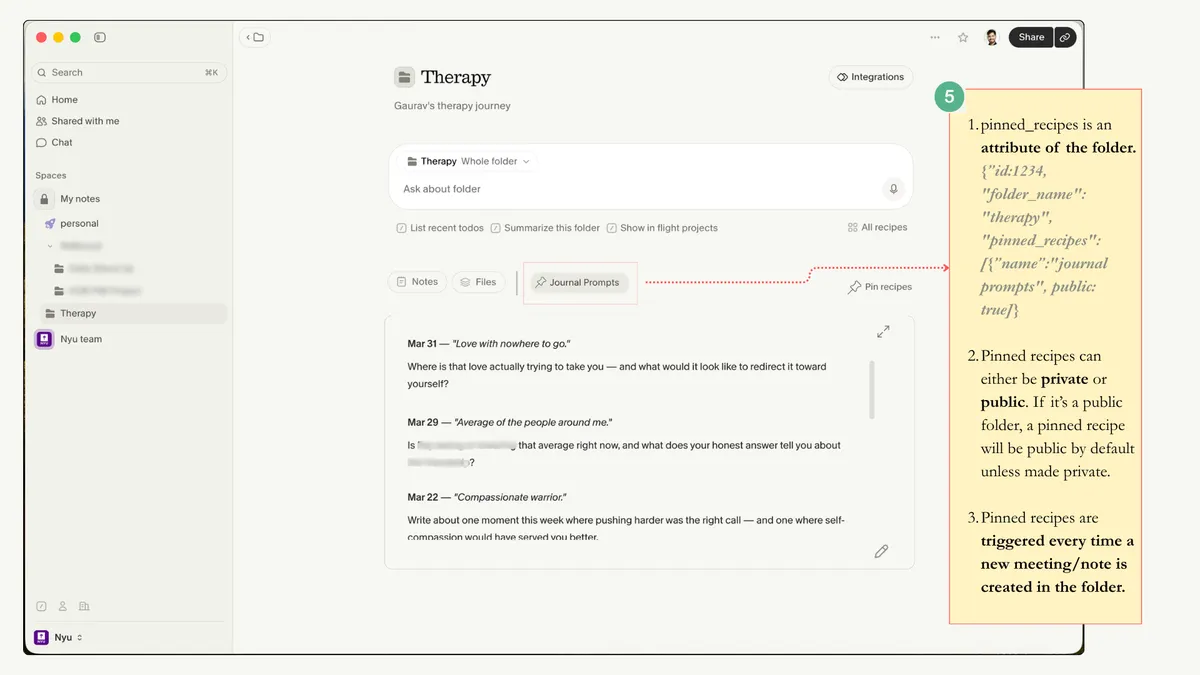
Once pinned, the recipe appears as a tab in the folder navigation panel. It becomes an attribute of the folder and updates whenever new meetings or notes are added. For shared folders, pinned recipes can be public or private.
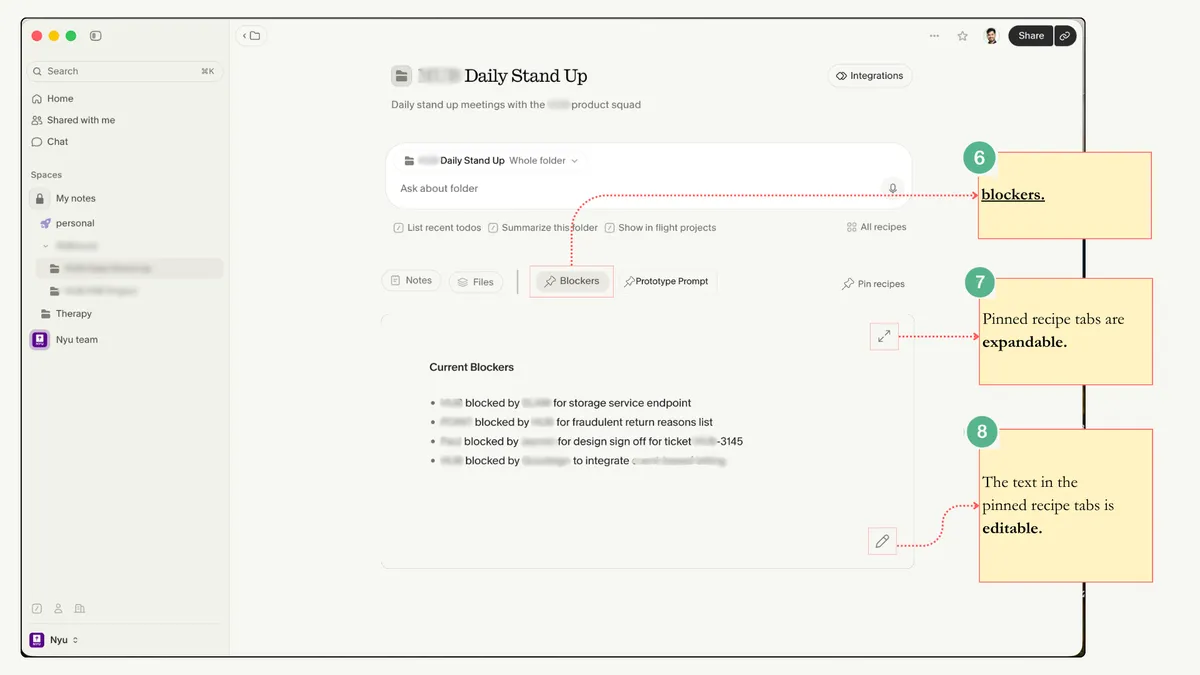
Pinned recipes are editable, just like regular meeting notes. The idea is to have LLM-generated notes blend seamlessly with human-generated notes.
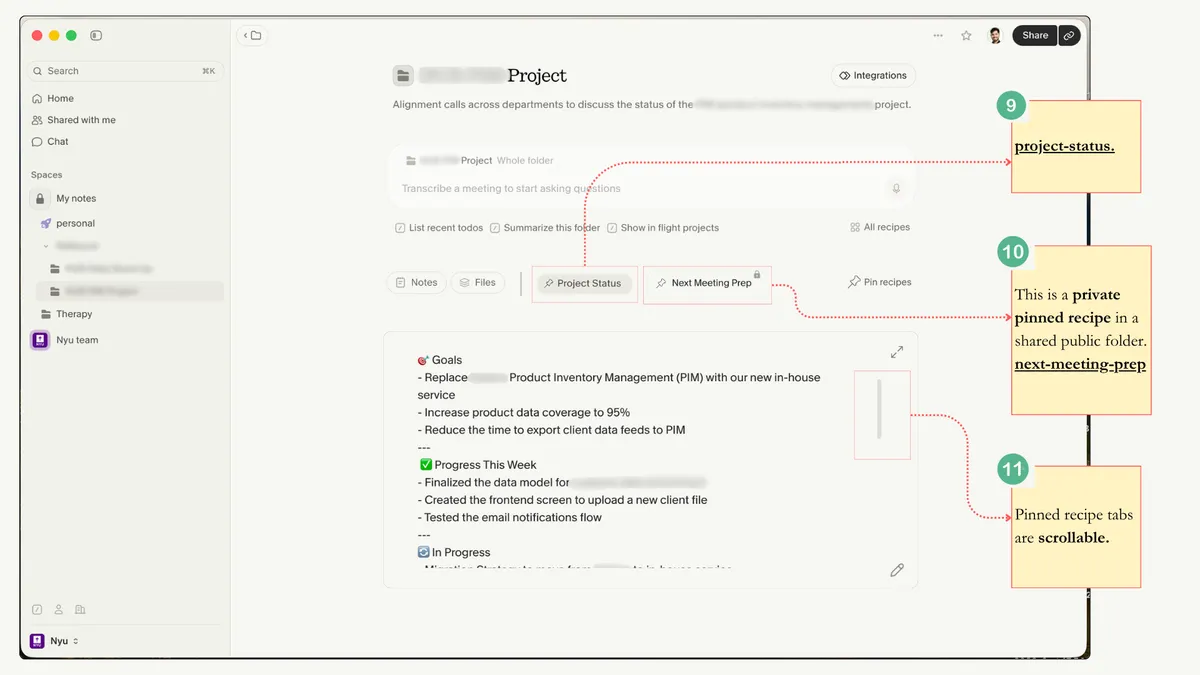
Pinned recipes could also be useful in enterprise contexts. For example, the blockers pinned recipe maintains a running list of issues surfaced during daily stand-ups, while the project-status pinned recipe keeps an up-to-date summary of ongoing discussions and open points.
Pinned recipes can also be private. The next-meeting-prep recipe helps me prepare for upcoming meetings and is only relevant to me, not everyone with access to the folder.
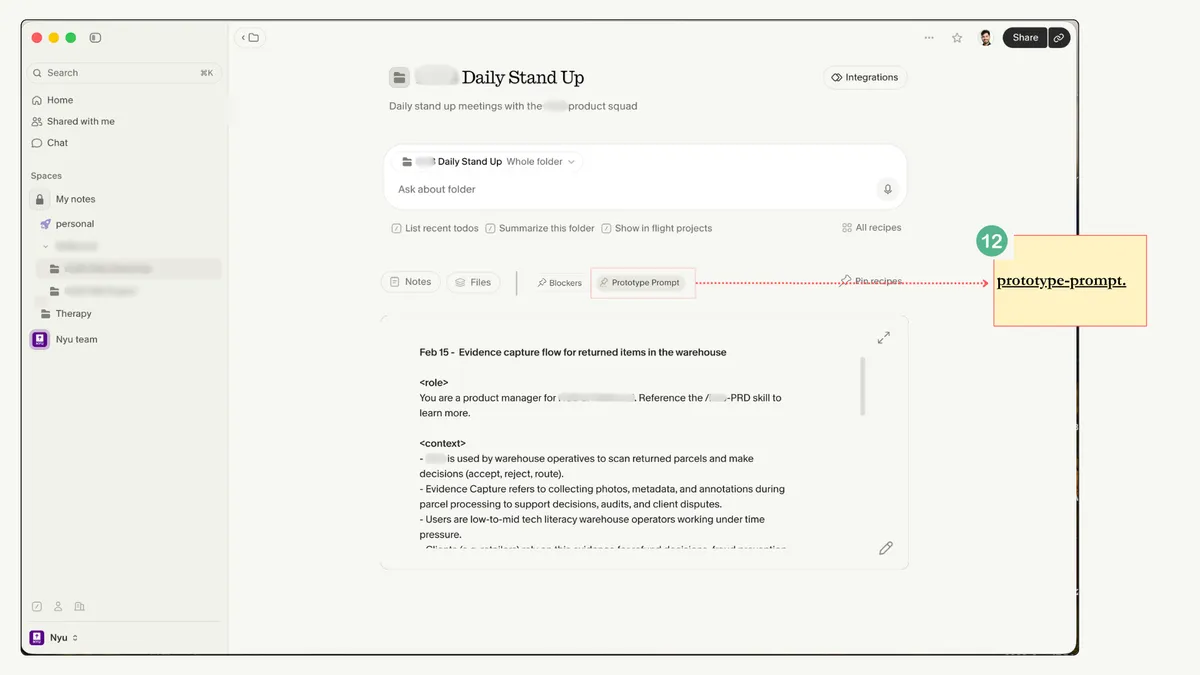
The prototype-prompt recipe scans meeting conversations for product bets and turns them into a well-constructed prototype prompt for Claude Code.
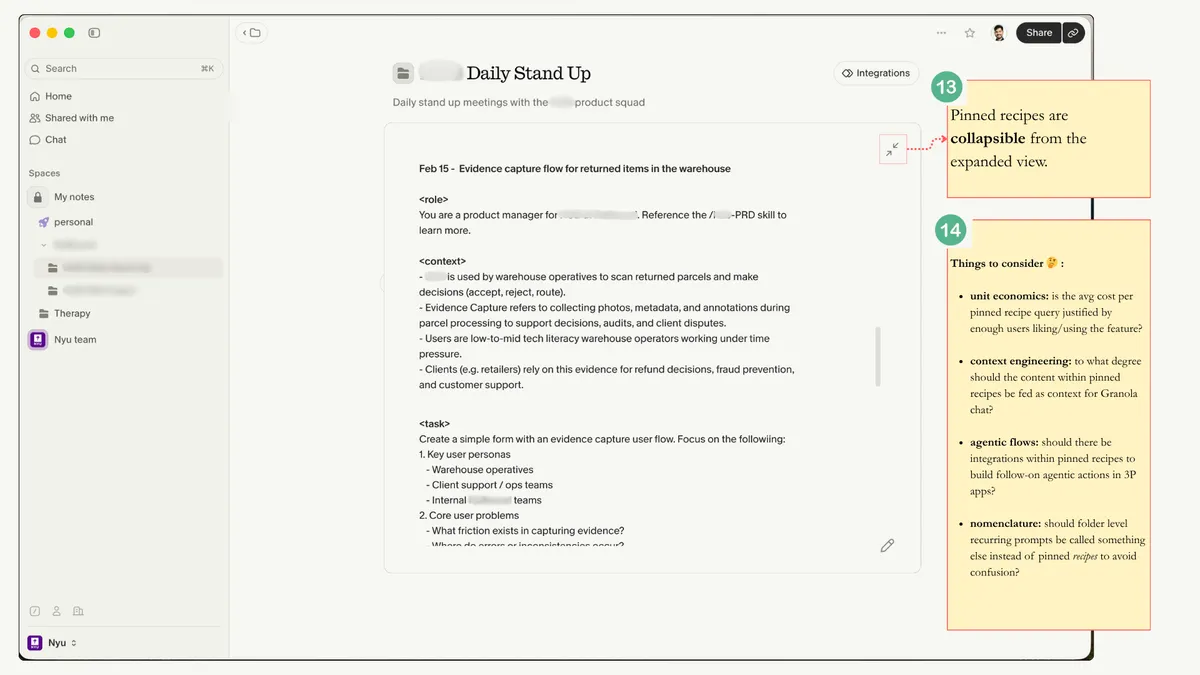
A few considerations must be noted:
Unit economics: Running recipes at the folder level could increase compute costs. This needs to be validated against real user value and engagement, which can only be understood through user interviews and usage patterns.
Context engineering: Pinned recipes should both consume and contribute context across the product. Knowledge from other parts of the app should feed into the recipe, and the output of the pinned recipe should flow back into the system.
Agentic flows: Recipes could potentially trigger follow-on actions in 3P applications, such as creating Linear tickets or posting to Slack.
Nomenclature: The term "Pinned Recipes" piggybacks on the existing concept of recipes. Presumably, users already have an understanding of recipes so adoption of pinned recipes may come more naturally. However, there's a risk of confusion as pinned recipes behave more like persistent, editable pages than one-off outputs inside the Granola chat. It may be worth testing alternative names for this feature, something that resembles the concept of pages, something like Cookbooks? The nomenclature and framing of the feature is something that could potentially be tested with users to see what sticks.
Pinned Recipes reinforce what makes Granola compelling: low friction, high function.
I believe low friction, high function is what will form the basis of successful products built on the AI application layer. Model capability is no longer the constraint. Context is expanding and inference is getting cheaper.
The real question is: how little does the user need to do to get value?
The winners will design for that gap.
Pinned Recipes are one small step in that direction. The true measure, as always, is whether users find them genuinely useful.